
SAC QRC3 2026: How the Summer Release Will Change Day-to-Day Operations
Three new chart types, faster wide tables, more flexibility for the business unit—and two AI features, one of which in particular is transforming the way we work on story design.
Contents

Three new chart types, faster wide tables, more flexibility for business users – and two AI features, one of which in particular is transforming story design.
On August 15 and 16, the third Quarterly Release Cycle (QRC3) of 2026 went live in the SAP Analytics Cloud (SAC) production systems. The release is being promoted for its AI features. However, the majority of the new features address things users deal with every day: additional chart types, shorter load times, and fewer clicks required for maintenance. The most significant single new feature is nonetheless an AI feature – script support in story design. Let’s take a look at them one by one.
Three New Chart Types
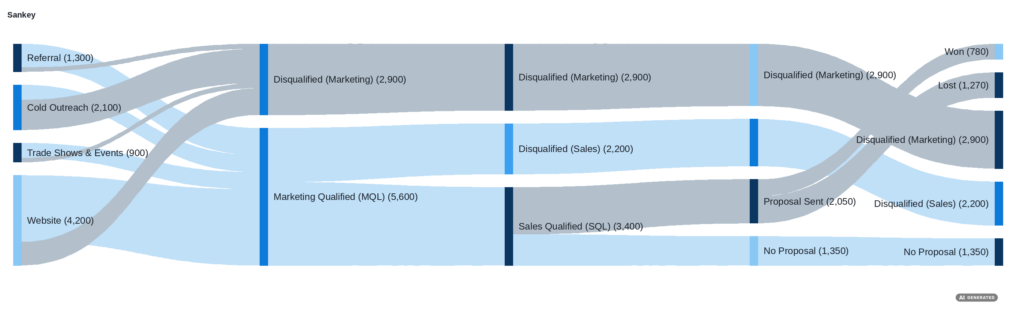
Funnel, Gauge, and Sankey are now available natively. The Funnel chart maps process stages, such as conversions or a sales pipeline. The Gauge chart immediately highlights a single KPI. The Sankey chart shows how values flow between stages or categories – often the only truly readable representation for topics such as fund allocation or customer flows.
None of these types is a new invention. What matters is that there’s no longer a need to resort to custom widgets and workarounds. This lowers maintenance costs, reduces dependence on extensions, and enables a few stories that simply couldn’t be implemented cleanly before.
Lazy Loading for Wide Tables
Less visible, but just as important in everyday use: the performance of wide tables. If a table has more columns than will fit on the screen, SAC initially loads only the visible ones. The rest are loaded as soon as the user scrolls horizontally.
This may sound unspectacular, but it has a direct impact on load times – especially for data-heavy reports that previously required users to wait. And in the end, that’s often exactly what determines acceptance within the business unit.
Quick Builder Now Also Available for Widgets
Until now, runtime editing via the Quick Builder was only available for tables. With QRC3, it can be enabled for other elements on a per-widget basis. Users can then swap out dimensions and metrics while viewing the story, without changing the underlying report.
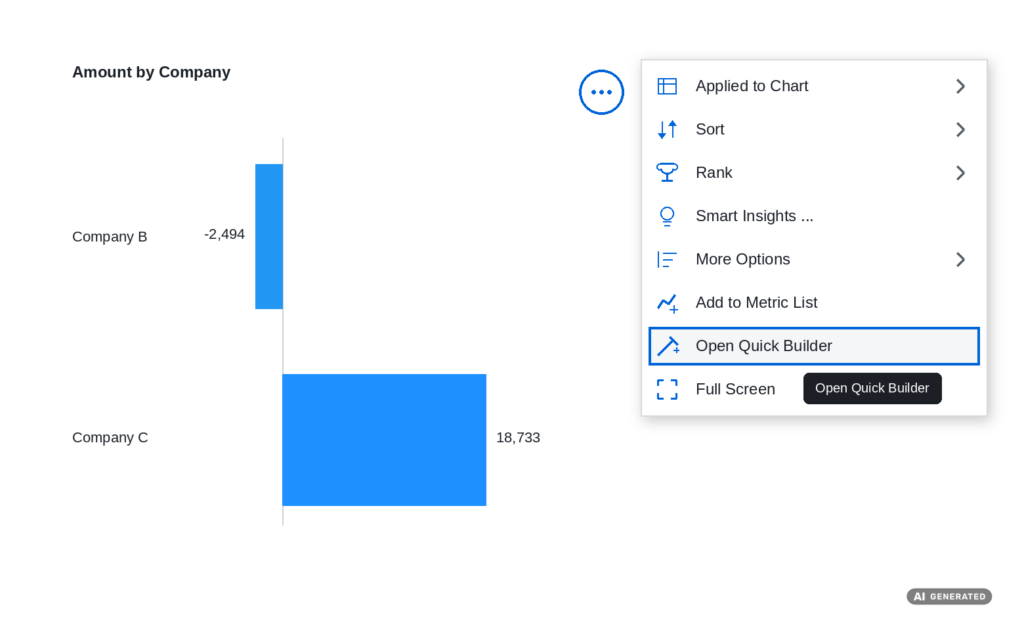
This is a workable compromise between self-service and governance: The business unit customizes its own dashboard, while the approved layout remains unchanged. For the central BI team, this means fewer ad hoc requests for minor adjustments.
Search and Replace in Filters
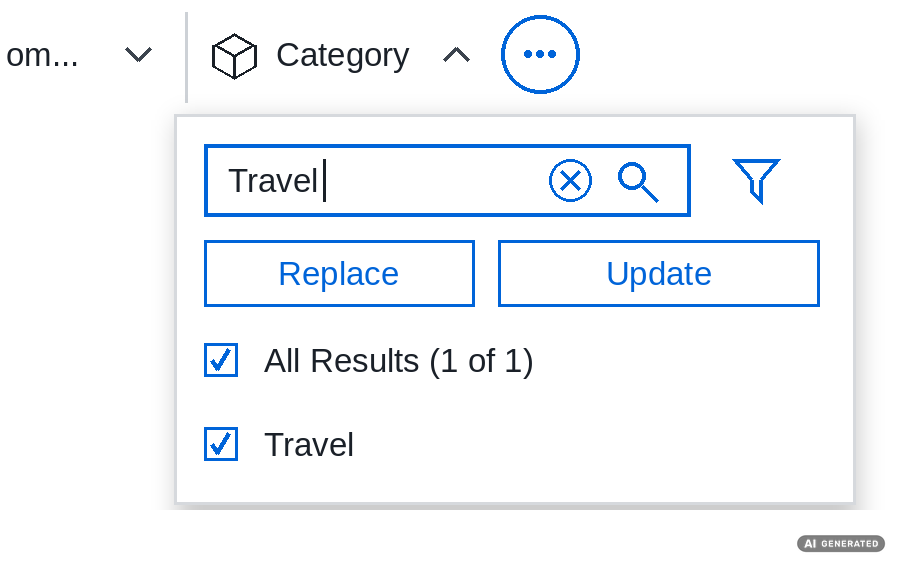
Filter values can now be searched for and replaced specifically, instead of having to break down and rebuild a filter. Anyone who maintains many stories or extensive filter definitions is familiar with the problem: If a value changes, the adjustment used to be a tedious, error-prone process.
This turns a tedious maintenance task into a straightforward, traceable step. It’s not a feature that makes headlines, but it’s exactly the kind of detail improvement that becomes second nature once you’ve used it.
Prompt Insights Right in the Story
The first of the two AI innovations is a prompt widget. A freely formulated prompt is combined with data from a table or chart, and SAC passes this context to a language model. The results – summaries, classifications, or risk assessments – appear right in the story, not in a separate tool.
The benefit lies less in the technology itself than in the elimination of the media discontinuity. Previously, the business unit would see the numbers and have to interpret them on its own or ask for clarification. Now, the interpretation appears right next to the metric. The path from “What am I seeing here?” to “What does this mean for us?” becomes significantly shorter.
Story Scripting in Natural Language
The second AI feature has the greater impact. Anyone who has ever had to take over someone else’s story scripts knows how time-consuming it is. The new feature works both ways: You describe what should happen in natural language, and SAC suggests the appropriate script logic. Conversely, you can explain existing code instead of having to parse it line by line.
This significantly lowers the barrier to entry. Designers without deep scripting experience can tackle more complex interactions, while experienced developers spend less time on routine tasks and onboarding. In teams where development capacity is already limited, this is where the release has the greatest impact.
Context: Who Will Benefit from This Release
QRC3 is not a release aimed at a single target group. The new charts and lazy loading improve the daily user experience. The Quick Builder gives business users more autonomy. The AI features – especially the scripting support – lighten the load for those building stories.
There is one limitation, however: Whether the AI features are available in your system depends on your edition and licensing. It’s worth checking your tenant before setting expectations. The full scope is listed in the SAP Road Map Explorer and the What’s New Viewer within the product.
Would you like to evaluate the release?
Which of these new features will actually have an impact on your SAC environment depends on your stories, models, and licenses. Contact us – BDF EXPERTS will assess the new features within the context of your system environment, from the initial evaluation through to
Related articles

Data Migration in SAP S/4HANA – Approaches, Planning, and Practical Implementation

25 years of BDF EXPERTS: 25 years in numbers (20/25)

Webinar Recap: SAP In-House Bank and APM
Finding
the rightsolution together.
We’re happy to answer your questions and help you find the right services to meet your needs.